
The My Keywords view includes all your keywords, their results and performance metrics. Keywords can be grouped and sorted for easier workflow.
Toolbar
The Toolbar includes several tools to manage how the content is presented in this view.

- Time Range: Select the time range you want data to be shown from. Affects the trend, visits, pages/visit, bounce rate and Adwords columns. The default is 4 weeks.
- Export: Export the currently visible data set.
- Filters: Toggle the keyword group(s) and market areas to see more specific keyword lists and data.
- Find: Search within the visible keyword set.
- Example: if you have added a keyword group Cameras including 500 camera-related keywords, you can filter them to show only keywords that include the word Canon.
- Keyword Suggestions: Top 5 suggestions as new keywords to monitor. These suggestions are based on human search behavior and related to your current keywords in monitoring.
Table
This table shows all your selected keywords with performance analytics.
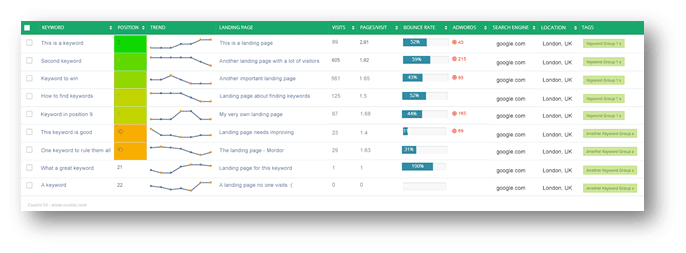
Checkbox (selection): selected keywords may be grouped or removed at the bottom of the page.

- Keyword: the keyword or phrase you want to be found on search engines.
- Position: your website’s position on search engine results.
- Green colors indicate 1st result page positions,
- Yellow and orange indicate 2nd result page positions.
- A clock icon is shown when the result hasn’t been indexed for the current week yet.
- N/A is shown if the result was not indexed for the selected week. Usually N/A is shown because the keyword wasn’t added to monitoring yet.
- Trend: how your position has changed during a selected time range (toolbar). The trend is search engine and location –specific.
- Landing Page: a) the content of your result on the selected search engine and b) click to see where your potential customers are forwarded from the search engine results.
- Visits: how many visits your landing page has gained from the selected search engine’s organic results within the selected time range.
- Pages/Visit: the average amount of pages the visitors have browsed within your website
- Bounce Rate: the percentage of visitors who enter the site and “bounce” (leave the site) rather than continue viewing other pages.
- Adwords: the round icon indicates there was an active Adwords advertisement found. The number shows the amount of paid visitors within the selected time range.
- Search Engine: selected search engine.
- Location: selected location (city).
- Tags: keyword groups – each keyword may belong to several groups.