
Competitor Overview gives you an insightful view to overall competitive situation. In addition, you are able to dig in deeper to competition with filters and competitor groups.
Toolbar

- Time Range: not currently in use in this view
- Export: Export the currently visible data set.
- Filters: Toggle the keyword group(s), competitor group(s) and market areas to see more specific competitive analytics. Sliders are provided for more accurate result scaling.
- Find: Search within the visible competitor set.
- Competitor Suggestions: Top 5 suggestions as new competitors to monitor. These suggestions are based on their visibility with your keyword set.
Market Shares on Google
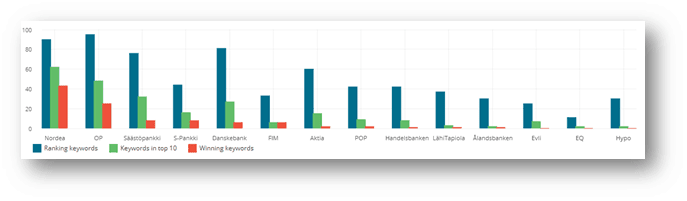
- Ranking keywords: With how many keywords the company is found on top 100 results
- Keywords in top XX: With how many keywords the company is found on top XX results. Default is top 10.
- Winning keywords: With how many keywords the company is found ahead of all other competitors within top XX results. Default result range is top 100.
Table
The data table provides you with numerical information about the competition on selected search engine.
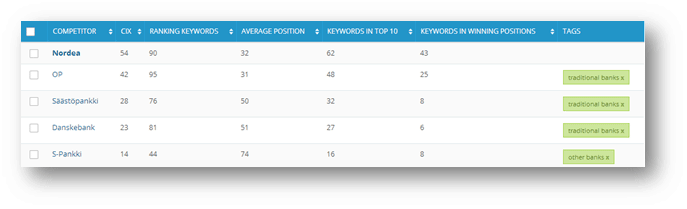
Checkbox (selection): selected competitors may be grouped or removed at the bottom of the page.

- Competitor: The name of the competitor.
- CIX: Cuutio Index indicates what kind of overall performance each competitor has. The scale is 0-100, where 80+ is very good.
- Ranking Keywords: With how many keywords the company is found on top 100 results
- Average Position: What is the company’s average position with the selected keyword group(s).
- Keywords in Top 10: With how many keywords the company is found on top XX results. Default is top 10. The scale can be adjusted with the sliders in the toolbar’s Filters section.
- Keywords in Winning Positions: With how many keywords the company is found ahead of all other competitors within top XX results. Default result range is top 100.
- Tags: Competitor groups. Each competitor may belong to various groups.