

Navigation
The header navigation is always presented at the top. The alternative sidebar navigation can be toggled with the button between the Cuutio logo and Dashboard link.
To get the most out of Cuutio, connect your Google Analytics account. Cuutio fetches some priority analytics and presents it combined with Cuutio’s own data in various views.
- Dashboard: summary of your visibility and competition.
- Keywords: visibility analytics about your important keywords.
- Competitors: includes all the competitive information.
- Traffic Sources: basic analytics data from connected traditional analytics such as Google Analytics.
- Account Dropdown: if you have access to several Cuutio accounts, you can view them here.
- Username: click this to access your personal and account configuration.
Plan
Tells your current Cuutio plan.
Keywords
Amount of monitored keywords / Maximum amount of keywords within your selected Cuutio plan.
Competitors
Amount of monitored competitors / Maximum amount of competitors within your selected Cuutio plan.
Upgrade Subscription
Click to see available Cuutio plans to upgrade / downgrade your subscription.
ADD KEYWORDS
Here you can add up to 100 keywords or keyword phrases simultaneously. If you are importing your keywords from Google Adwords, remove special characters (+, [, ] and “) from the keywords before importing them to Cuutio. Cuutio indexes the results the way normal searcher would and special characters may cause Cuutio to show you inaccurate positions for your keywords.
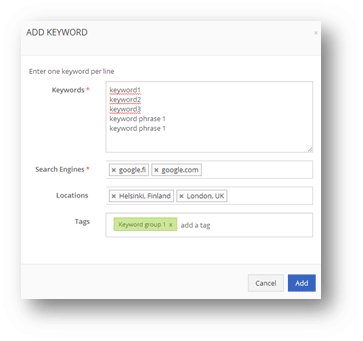
- Keywords: One keyword phrase may include several individual words. Keywords should be exact presumptions about how your customers may use them on search engines. Add one keyword per line – up to 100 at the same time.
- Search Engines: choose from a list of available search engines (managed in account settings).
- Locations: choose from a list of available locations (managed in account settings)
- Tags: choose keyword groups(s) for the new keywords.
ADD COMPETITORS
Add new competitors for monitoring.
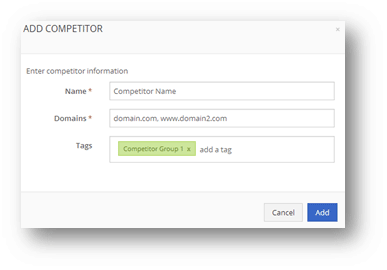
- Name: choose a name for your competitor. This is showed in the reports in various views.
- Domains: add as many domains you need and separate them with commas.
- Tags: add this competitor to competitor group(s)
Support & Feedback
Click Support to access this support site. Use the in-app chat to contact customer support.