
Click your username at the top right corner of the application to access account configuration.
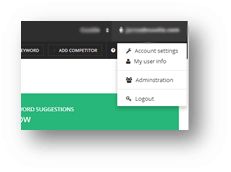
Account Settings
Account
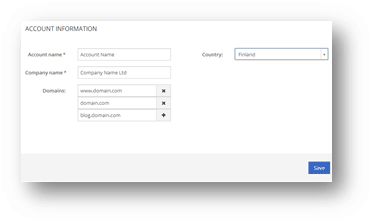
- Account Name: the name of your account.
- Company Name: the name of your company.
- Domains: domains in monitoring. Add all domains that are relevant to your visibility. Remember that www.domain.com is a different domain than domain.com, so if you are not sure which your primary domain is, add both. Also subdomains such as blog.domain.com should be added separately.
- Page Paths (or exact urls): A great way to monitor eg. social media updates’ visibility on search engines. Add your social media addresses (facebook.com/yourcompany or twitter.com/yourcompany). Youtube videos tend to show up in search engine results, so you should add them too. Unfortunately Youtube doesn’t support user-based addresses, so you need to add each video’s address separately.
- Country: your country.
Users
Here you can find a list of users that have access to this account. Click a user to manage their details or add a new one if your plan’s limits are not exceeded.
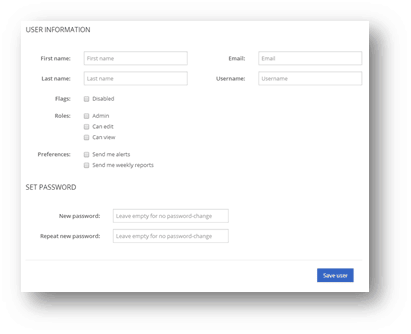
- Flags: select disabled to prevent this user’s access to your account
- Roles:
- Admin: can see and edit all account data
- Can edit: can edit keyword and competitor data
- Can view: has read only access and cannot edit anything
- Preferences
- Send me alerts: receives alerts
- Send me reports: receives reports
Analytics
See your analytics connections, connect to new profiles and revoke unwanted connections.
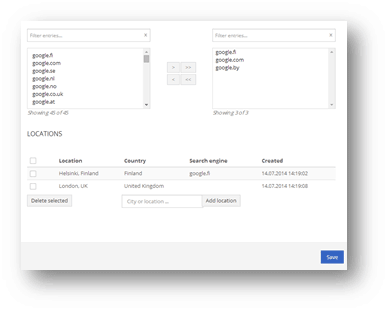
Search Engines
Manage your market areas and locations you want to monitor.
Billing and Subscription
More information about your current plan, payments and other available plans. In some cases you may find your reseller’s contact information here.
My User Info
Manage your personal preferences.